> ## Documentation Index
> Fetch the complete documentation index at: https://docs.leapter.com/llms.txt
> Use this file to discover all available pages before exploring further.
# Review & Approvals
> Gate changes before they reach main — assign reviewers, require checks like four-eyes approval or passing tests, and save a draft with confidence.
When a project uses the **Pending changes + Save** [change workflow](/fundamentals/track-changes/change-workflow), saving a draft to main runs through **Review & Delivery**. This is where you see what changed, assign reviewers, and satisfy any **approval rules** the project requires before the change can land — the controls that let a regulated team prove every change was checked before it went live.
## Prerequisites
* The project's [change workflow](/fundamentals/track-changes/change-workflow) is set to **Pending changes + Save** (or the Git PR variant).
* You are working on a **draft** with at least one pending change.
## The Review & Delivery panel
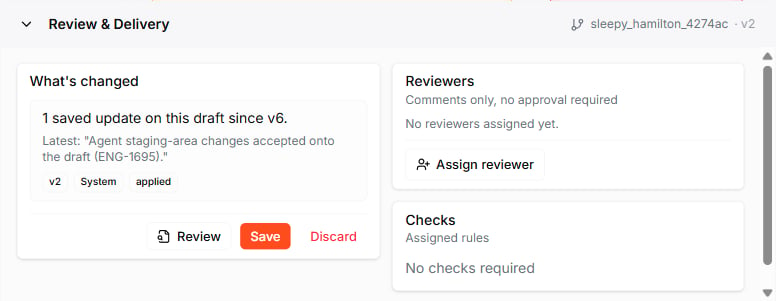
While you are on a draft, the **Review & Delivery** panel appears at the bottom of the editor.
 | Section | What it shows |
| :----------------- | :------------------------------------------------------------------------------------------------------------- |
| **What's changed** | A summary of the updates on this draft since the last saved version |
| **Reviewers** | Who is reviewing the draft, and whether their approval is required — assign reviewers with **Assign reviewer** |
| **Checks** | The [approval rules](#approval-rules) that apply to this draft and whether they pass |
| **Actions** | **Review** the changes in detail, **Save** the draft to main, or **Discard** it |
Saving prompts you to confirm — it applies your pending changes as the new version for everyone.
## Approval rules
Approval rules gate a draft's readiness to reach main. You set them per project, in the same **Change Workflow** settings where you choose the [workflow](/fundamentals/track-changes/change-workflow), under **Review rules**.
| Section | What it shows |
| :----------------- | :------------------------------------------------------------------------------------------------------------- |
| **What's changed** | A summary of the updates on this draft since the last saved version |
| **Reviewers** | Who is reviewing the draft, and whether their approval is required — assign reviewers with **Assign reviewer** |
| **Checks** | The [approval rules](#approval-rules) that apply to this draft and whether they pass |
| **Actions** | **Review** the changes in detail, **Save** the draft to main, or **Discard** it |
Saving prompts you to confirm — it applies your pending changes as the new version for everyone.
## Approval rules
Approval rules gate a draft's readiness to reach main. You set them per project, in the same **Change Workflow** settings where you choose the [workflow](/fundamentals/track-changes/change-workflow), under **Review rules**.
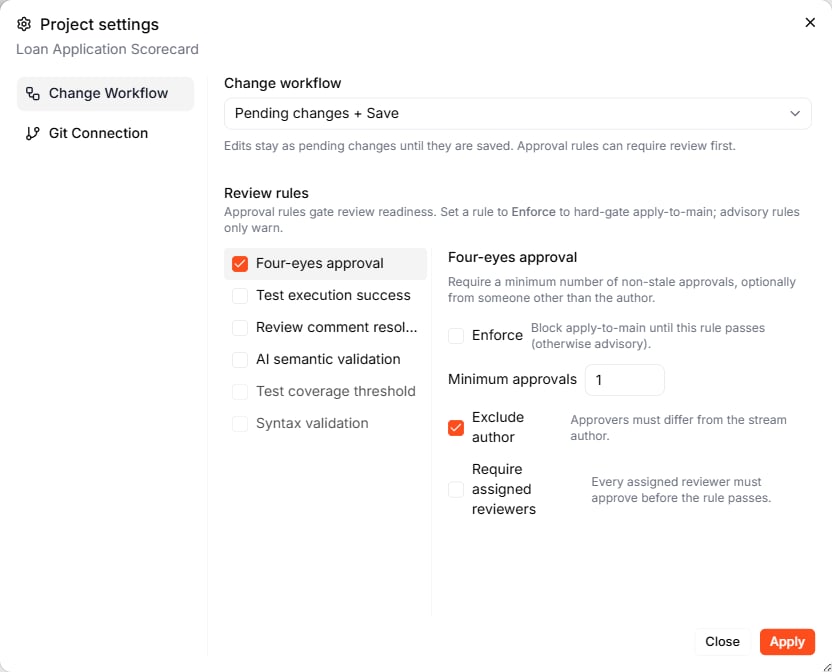 Each rule can be set to **Enforce** or left as advisory:
* **Enforce** — the rule **hard-gates** apply-to-main. The draft cannot be saved until the rule passes.
* **Advisory** — the rule only **warns**. It surfaces a problem but does not block saving.
### Available rules
| Rule | What it checks |
| :---------------------------- | :------------------------------------------------------------------------------------- |
| **Four-eyes approval** | A minimum number of non-stale approvals, optionally from someone other than the author |
| **Test execution success** | The project's [test suites](/fundamentals/test-suites) pass |
| **Review comment resolution** | Open [review comments](/fundamentals/collaborating) have been resolved |
| **AI semantic validation** | An AI check of whether the change is internally consistent |
| **Test coverage threshold** | Test coverage meets a set minimum |
| **Syntax validation** | The Blueprint is structurally valid |
Enable a rule to configure it. For example, **Four-eyes approval** lets you set:
* **Minimum approvals** — how many approvals are needed
* **Exclude author** — approvers must differ from the stream author, so no one can approve their own work
* **Require assigned reviewers** — every assigned reviewer must approve before the rule passes
## Save a reviewed draft
1. On the draft, open the **Review & Delivery** panel.
2. Check **What's changed** and, if needed, click **Review** to inspect the diff.
3. Assign reviewers under **Reviewers** if the project requires approval.
4. Make sure every enforced rule under **Checks** passes.
5. Click **Save** and confirm.
Leapter merges the draft into main and records an **Apply *\*** entry on the [Timeline](/fundamentals/track-changes/timeline).
With **Four-eyes approval** enforced and **Exclude author** on, you cannot approve your own draft — a second team member has to. Make sure your project has more than one member before enforcing it, or you will not be able to save.
## What to do next
* **[Change Workflow](/fundamentals/track-changes/change-workflow)** — the setting that turns on drafts and this review flow
* **[Timeline](/fundamentals/track-changes/timeline)** — see applied drafts and every version in the change graph
* **[Collaborating](/fundamentals/collaborating)** — leave and resolve review comments on Blueprints
Each rule can be set to **Enforce** or left as advisory:
* **Enforce** — the rule **hard-gates** apply-to-main. The draft cannot be saved until the rule passes.
* **Advisory** — the rule only **warns**. It surfaces a problem but does not block saving.
### Available rules
| Rule | What it checks |
| :---------------------------- | :------------------------------------------------------------------------------------- |
| **Four-eyes approval** | A minimum number of non-stale approvals, optionally from someone other than the author |
| **Test execution success** | The project's [test suites](/fundamentals/test-suites) pass |
| **Review comment resolution** | Open [review comments](/fundamentals/collaborating) have been resolved |
| **AI semantic validation** | An AI check of whether the change is internally consistent |
| **Test coverage threshold** | Test coverage meets a set minimum |
| **Syntax validation** | The Blueprint is structurally valid |
Enable a rule to configure it. For example, **Four-eyes approval** lets you set:
* **Minimum approvals** — how many approvals are needed
* **Exclude author** — approvers must differ from the stream author, so no one can approve their own work
* **Require assigned reviewers** — every assigned reviewer must approve before the rule passes
## Save a reviewed draft
1. On the draft, open the **Review & Delivery** panel.
2. Check **What's changed** and, if needed, click **Review** to inspect the diff.
3. Assign reviewers under **Reviewers** if the project requires approval.
4. Make sure every enforced rule under **Checks** passes.
5. Click **Save** and confirm.
Leapter merges the draft into main and records an **Apply *\*** entry on the [Timeline](/fundamentals/track-changes/timeline).
With **Four-eyes approval** enforced and **Exclude author** on, you cannot approve your own draft — a second team member has to. Make sure your project has more than one member before enforcing it, or you will not be able to save.
## What to do next
* **[Change Workflow](/fundamentals/track-changes/change-workflow)** — the setting that turns on drafts and this review flow
* **[Timeline](/fundamentals/track-changes/timeline)** — see applied drafts and every version in the change graph
* **[Collaborating](/fundamentals/collaborating)** — leave and resolve review comments on Blueprints