> ## Documentation Index
> Fetch the complete documentation index at: https://docs.leapter.com/llms.txt
> Use this file to discover all available pages before exploring further.
# Change Workflow
> Choose how edits to a project are saved — immediately, or on a draft that you save to main when it is ready, optionally after a review.
Every project has a **change workflow** that decides what happens when you edit it. Either every edit is saved immediately, or your edits collect on a **draft** and reach the rest of your team only when you save the draft to main — optionally after a [review](/track-changes/review-and-approvals).
## Choose the workflow
The change workflow is a setting of each project. Only workspace owners can change it.
1. Go to the **Projects** page.
2. Click **⋮** on the project card and select **Settings**.
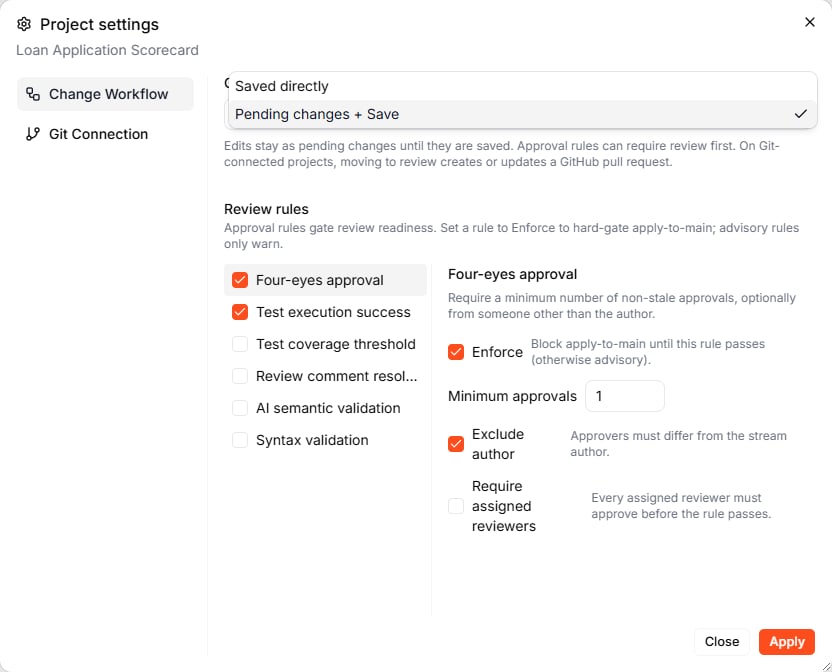
3. On the **Change Workflow** tab, pick the workflow and click **Apply**.
 | Workflow | What happens when you edit |
| :- | :- |
| **Saved directly** | Every edit updates the saved version immediately. There is no Save button. New projects start with this workflow. |
| **Pending changes + Save** | Main is read-only. Your edits go to a draft and reach main when you save the draft. [Review rules](/track-changes/review-and-approvals#set-up-review-rules) can require a review first. |
Changing the workflow does not touch the project's history.
## Saved directly
In **Saved directly** mode, editing *is* saving. Each change you make — by hand, with the [Lab Agent](/editing/lab-agent), or with [Ctrl+I](/editing/lab-agent#point-the-agent-at-a-node-with-ctrli) — updates the project straight away and appears on the [Timeline](/track-changes/timeline) as a new change on **main**.
This is the fastest way to work, and a good fit while you build a project on your own.
## Pending changes + Save
In **Pending changes + Save** mode, **main** is read-only: the stream pill at the bottom of the editor shows a lock. You work on a **draft** — a separate stream that starts from the current version of main. Your team keeps working with main until you save the draft.
### Start a draft
* **Just start editing.** When you change something on main, Leapter creates a new draft from the current main version and switches you to it. A message confirms it, for example *Draft created from main v10*.
* **Give it a name first.** Click **+ New draft** at the top of the [Timeline](/track-changes/timeline), describe what the draft is about, and click **Create**. If you leave the name empty, Leapter names the draft after the project.
| Workflow | What happens when you edit |
| :- | :- |
| **Saved directly** | Every edit updates the saved version immediately. There is no Save button. New projects start with this workflow. |
| **Pending changes + Save** | Main is read-only. Your edits go to a draft and reach main when you save the draft. [Review rules](/track-changes/review-and-approvals#set-up-review-rules) can require a review first. |
Changing the workflow does not touch the project's history.
## Saved directly
In **Saved directly** mode, editing *is* saving. Each change you make — by hand, with the [Lab Agent](/editing/lab-agent), or with [Ctrl+I](/editing/lab-agent#point-the-agent-at-a-node-with-ctrli) — updates the project straight away and appears on the [Timeline](/track-changes/timeline) as a new change on **main**.
This is the fastest way to work, and a good fit while you build a project on your own.
## Pending changes + Save
In **Pending changes + Save** mode, **main** is read-only: the stream pill at the bottom of the editor shows a lock. You work on a **draft** — a separate stream that starts from the current version of main. Your team keeps working with main until you save the draft.
### Start a draft
* **Just start editing.** When you change something on main, Leapter creates a new draft from the current main version and switches you to it. A message confirms it, for example *Draft created from main v10*.
* **Give it a name first.** Click **+ New draft** at the top of the [Timeline](/track-changes/timeline), describe what the draft is about, and click **Create**. If you leave the name empty, Leapter names the draft after the project.
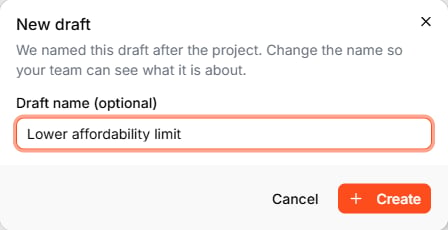 The name is also the draft's address — it appears in the link in your browser, for example `?stream=lower_affordability_limit` — so you can send the link to a colleague. To change the name later, click **Rename** in **Review & Delivery**, as long as the draft is not in review.
### Work on the draft
Edit as usual — by hand or with the Lab Agent. Each change creates a new version of the draft (v1, v2, …) on the Timeline. The stream pill at the bottom of the editor shows the draft and its version; click it to open **Review & Delivery**.
### Save the draft to main
Open **Review & Delivery** from the stream pill. What you can do depends on the project's review rules:
| Action | When | What it does |
| :- | :- | :- |
| **Save** | The project has no review rules, or the review is done | Saves the draft's changes as the new version of main for everyone, after you confirm |
| **Move to review** | The project has review rules | Starts a review. See [Review & Approvals](/track-changes/review-and-approvals). |
| **Discard** | Any time | Throws the draft away. Main stays as it is. |
Only the person who created the draft, or a workspace owner, can save, move to review, or discard it.
After you save, main has a new version, and the Timeline shows the change on main with the draft's lane closed. [Releases](/release-and-integrate/releases) are created from main — save a draft before you release its changes.
## What to do next
* **[Review & Approvals](/track-changes/review-and-approvals)** — have a teammate review a draft before it reaches main
* **[Timeline](/track-changes/timeline)** — follow drafts and saved changes in the change graph
* **[Test your Blueprint](/test-and-validate/test-your-blueprint)** — check a draft before you save it
This documentation is built and hosted on [Mintlify](https://mintlify.com), a developer documentation platform.
The name is also the draft's address — it appears in the link in your browser, for example `?stream=lower_affordability_limit` — so you can send the link to a colleague. To change the name later, click **Rename** in **Review & Delivery**, as long as the draft is not in review.
### Work on the draft
Edit as usual — by hand or with the Lab Agent. Each change creates a new version of the draft (v1, v2, …) on the Timeline. The stream pill at the bottom of the editor shows the draft and its version; click it to open **Review & Delivery**.
### Save the draft to main
Open **Review & Delivery** from the stream pill. What you can do depends on the project's review rules:
| Action | When | What it does |
| :- | :- | :- |
| **Save** | The project has no review rules, or the review is done | Saves the draft's changes as the new version of main for everyone, after you confirm |
| **Move to review** | The project has review rules | Starts a review. See [Review & Approvals](/track-changes/review-and-approvals). |
| **Discard** | Any time | Throws the draft away. Main stays as it is. |
Only the person who created the draft, or a workspace owner, can save, move to review, or discard it.
After you save, main has a new version, and the Timeline shows the change on main with the draft's lane closed. [Releases](/release-and-integrate/releases) are created from main — save a draft before you release its changes.
## What to do next
* **[Review & Approvals](/track-changes/review-and-approvals)** — have a teammate review a draft before it reaches main
* **[Timeline](/track-changes/timeline)** — follow drafts and saved changes in the change graph
* **[Test your Blueprint](/test-and-validate/test-your-blueprint)** — check a draft before you save it
This documentation is built and hosted on [Mintlify](https://mintlify.com), a developer documentation platform.