> ## Documentation Index
> Fetch the complete documentation index at: https://docs.leapter.com/llms.txt
> Use this file to discover all available pages before exploring further.
# Review & Approvals
> Have a teammate review a draft before it reaches main — move it to review, comment and decide, and save it once every rule passes.
When a project holds edits on drafts, its **review rules** decide what a draft needs before it can be saved to main — for example, an approval from a second person and passing tests. The review happens in the editor: the reviewer sees exactly what changed, comments on the elements, and approves or requests changes. Every step is recorded, so you can show later who checked a change and when.
## Prerequisites
* The project's [change workflow](/track-changes/change-workflow) is **Pending changes + Save**.
* At least one review rule is turned on (see below). A workspace owner sets both.
* For **Four-eyes approval**, a second member in the workspace who can review.
## Set up review rules
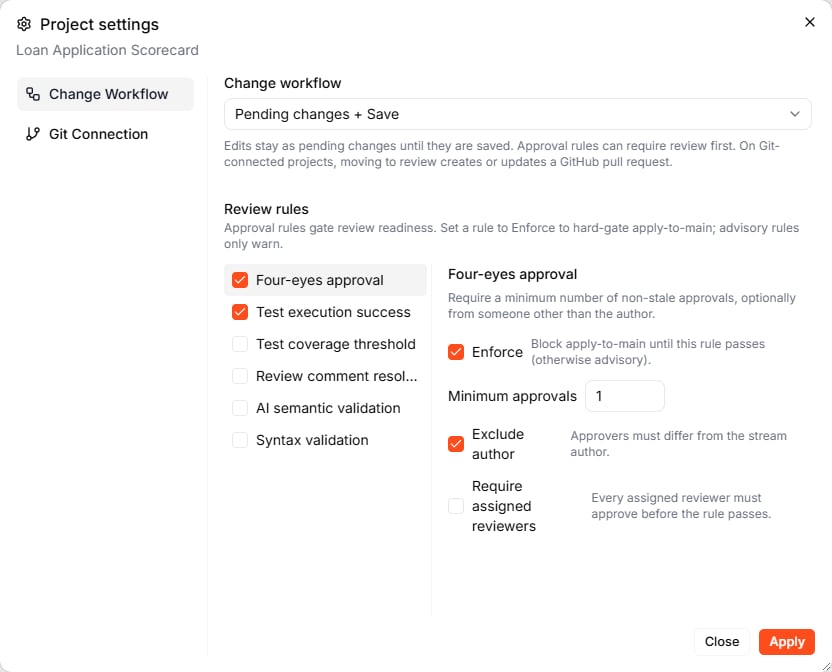
Review rules live in the same place as the change workflow: **Projects** › **⋮** on the project card › **Settings** › **Change Workflow** › **Review rules**. Select a rule to turn it on, then click it to see its settings.
 | Rule | What it checks |
| :- | :- |
| **Four-eyes approval** | A minimum number of current approvals, optionally from someone other than the author |
| **Test execution success** | The latest [test](/test-and-validate/test-suites) run of the current version completed without failures |
| **Test coverage threshold** | The latest test run reports coverage at or above a minimum (**Minimum coverage %**, 50 by default) |
| **Review comment resolution** | Every review comment is marked **Done** |
| **AI semantic validation** | An AI review of the Blueprints for semantic correctness against their requirements |
| **Syntax validation** | The project passes validation without errors |
Each rule can **Enforce** — then the draft cannot be saved until the rule passes — or only warn, if you leave **Enforce** off.
**Four-eyes approval** has three more settings:
* **Minimum approvals** — how many approvals the draft needs
* **Exclude author** — the author's own approval does not count (on by default)
* **Require assigned reviewers** — every assigned reviewer must approve, in addition to the minimum
Leapter also checks the **Merge status** of every draft, whether you turn on rules or not — see [When main has moved on](#when-main-has-moved-on).
An approval counts only for the version it was given on. If the draft changes afterwards, the reviewer has to decide again.
## The Review & Delivery panel
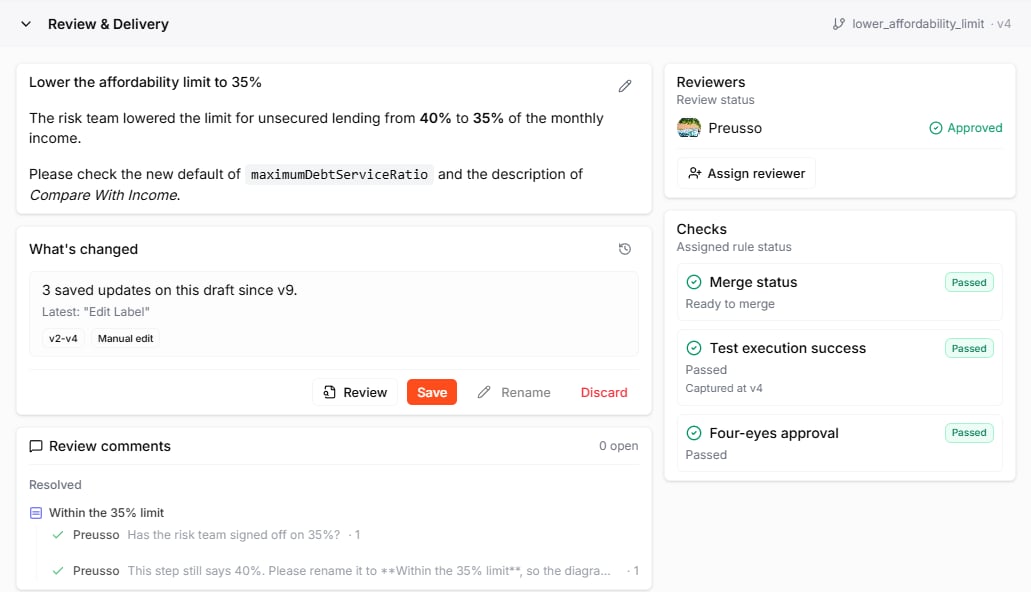
Click the stream pill at the bottom of the editor to open **Review & Delivery** for the draft you are on.
| Rule | What it checks |
| :- | :- |
| **Four-eyes approval** | A minimum number of current approvals, optionally from someone other than the author |
| **Test execution success** | The latest [test](/test-and-validate/test-suites) run of the current version completed without failures |
| **Test coverage threshold** | The latest test run reports coverage at or above a minimum (**Minimum coverage %**, 50 by default) |
| **Review comment resolution** | Every review comment is marked **Done** |
| **AI semantic validation** | An AI review of the Blueprints for semantic correctness against their requirements |
| **Syntax validation** | The project passes validation without errors |
Each rule can **Enforce** — then the draft cannot be saved until the rule passes — or only warn, if you leave **Enforce** off.
**Four-eyes approval** has three more settings:
* **Minimum approvals** — how many approvals the draft needs
* **Exclude author** — the author's own approval does not count (on by default)
* **Require assigned reviewers** — every assigned reviewer must approve, in addition to the minimum
Leapter also checks the **Merge status** of every draft, whether you turn on rules or not — see [When main has moved on](#when-main-has-moved-on).
An approval counts only for the version it was given on. If the draft changes afterwards, the reviewer has to decide again.
## The Review & Delivery panel
Click the stream pill at the bottom of the editor to open **Review & Delivery** for the draft you are on.
 | Section | What it shows |
| :- | :- |
| Title and description | What the change is about, written when the draft was moved to review. Click the pencil to edit. |
| **What's changed** | How many versions the draft has since it started from main, and the actions **Review**, **Save**, **Rename**, and **Discard**. The clock icon opens the [review history](#review-history). |
| **Review comments** | The comments written in this review, with replies, open and resolved |
| **Submit your review** | Where a reviewer approves or requests changes |
| **Reviewers** | Who reviews the draft and what they decided: **Awaiting**, **Approved**, or **Changes requested** |
| **Checks** | Every rule and whether it passes, with the reason when it does not |
## Review a draft, step by step
The example below follows a change to the Loan Application Scorecard: the author lowers the affordability limit from 40% to 35%, and a colleague reviews it.
### 1. Move the draft to review
On the draft, open **Review & Delivery** and click **Move to review**. Give the review a title and, optionally, a description — Markdown is supported, and **Preview** shows how it will look.
| Section | What it shows |
| :- | :- |
| Title and description | What the change is about, written when the draft was moved to review. Click the pencil to edit. |
| **What's changed** | How many versions the draft has since it started from main, and the actions **Review**, **Save**, **Rename**, and **Discard**. The clock icon opens the [review history](#review-history). |
| **Review comments** | The comments written in this review, with replies, open and resolved |
| **Submit your review** | Where a reviewer approves or requests changes |
| **Reviewers** | Who reviews the draft and what they decided: **Awaiting**, **Approved**, or **Changes requested** |
| **Checks** | Every rule and whether it passes, with the reason when it does not |
## Review a draft, step by step
The example below follows a change to the Loan Application Scorecard: the author lowers the affordability limit from 40% to 35%, and a colleague reviews it.
### 1. Move the draft to review
On the draft, open **Review & Delivery** and click **Move to review**. Give the review a title and, optionally, a description — Markdown is supported, and **Preview** shows how it will look.
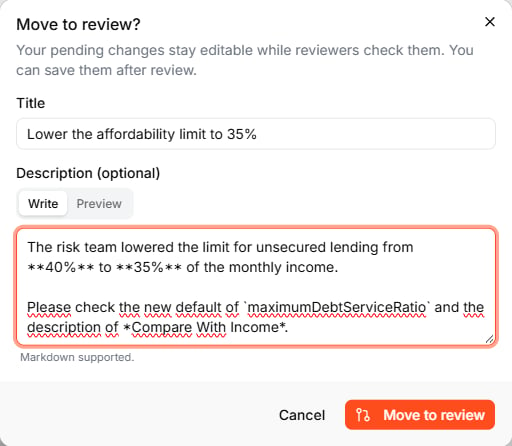 Leapter checks the rules right away — for example, it runs the test suites. Your changes stay editable while the review runs; every new version is checked again.
### 2. Assign a reviewer
Under **Reviewers**, click **Assign reviewer** and pick a member of the workspace. Assigning someone does not send them a notification — share the link to the draft with them, or @mention them in a comment.
Any member of the workspace can review, assigned or not.
### 3. Review the changes
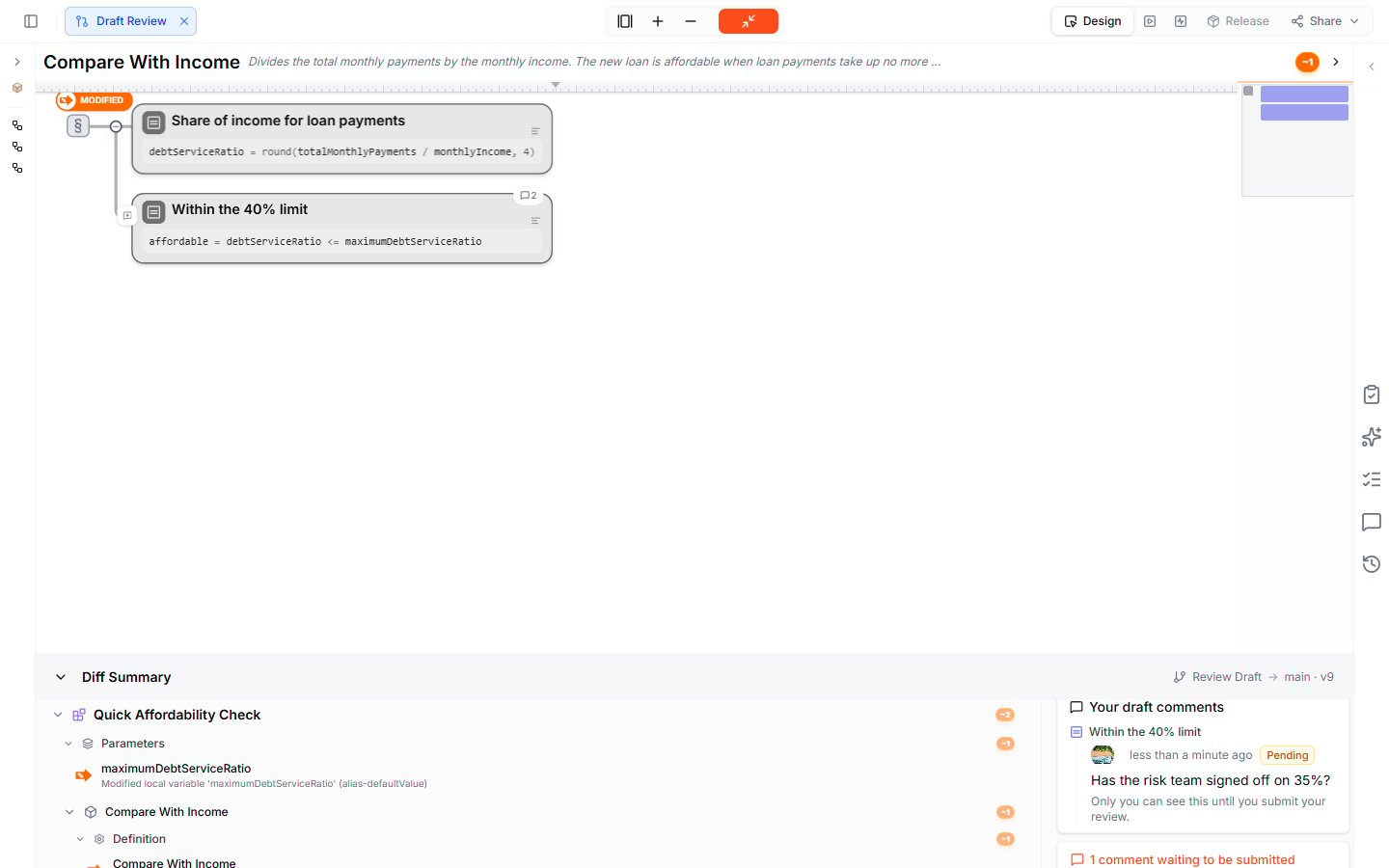
The reviewer opens the draft and clicks **Review** in **Review & Delivery**. The editor switches to **Draft Review**: unchanged parts are greyed out, every changed element is marked **MODIFIED** with the old value struck through in red and the new one in green, and the **Diff Summary** at the bottom lists every change.
Leapter checks the rules right away — for example, it runs the test suites. Your changes stay editable while the review runs; every new version is checked again.
### 2. Assign a reviewer
Under **Reviewers**, click **Assign reviewer** and pick a member of the workspace. Assigning someone does not send them a notification — share the link to the draft with them, or @mention them in a comment.
Any member of the workspace can review, assigned or not.
### 3. Review the changes
The reviewer opens the draft and clicks **Review** in **Review & Delivery**. The editor switches to **Draft Review**: unchanged parts are greyed out, every changed element is marked **MODIFIED** with the old value struck through in red and the new one in green, and the **Diff Summary** at the bottom lists every change.
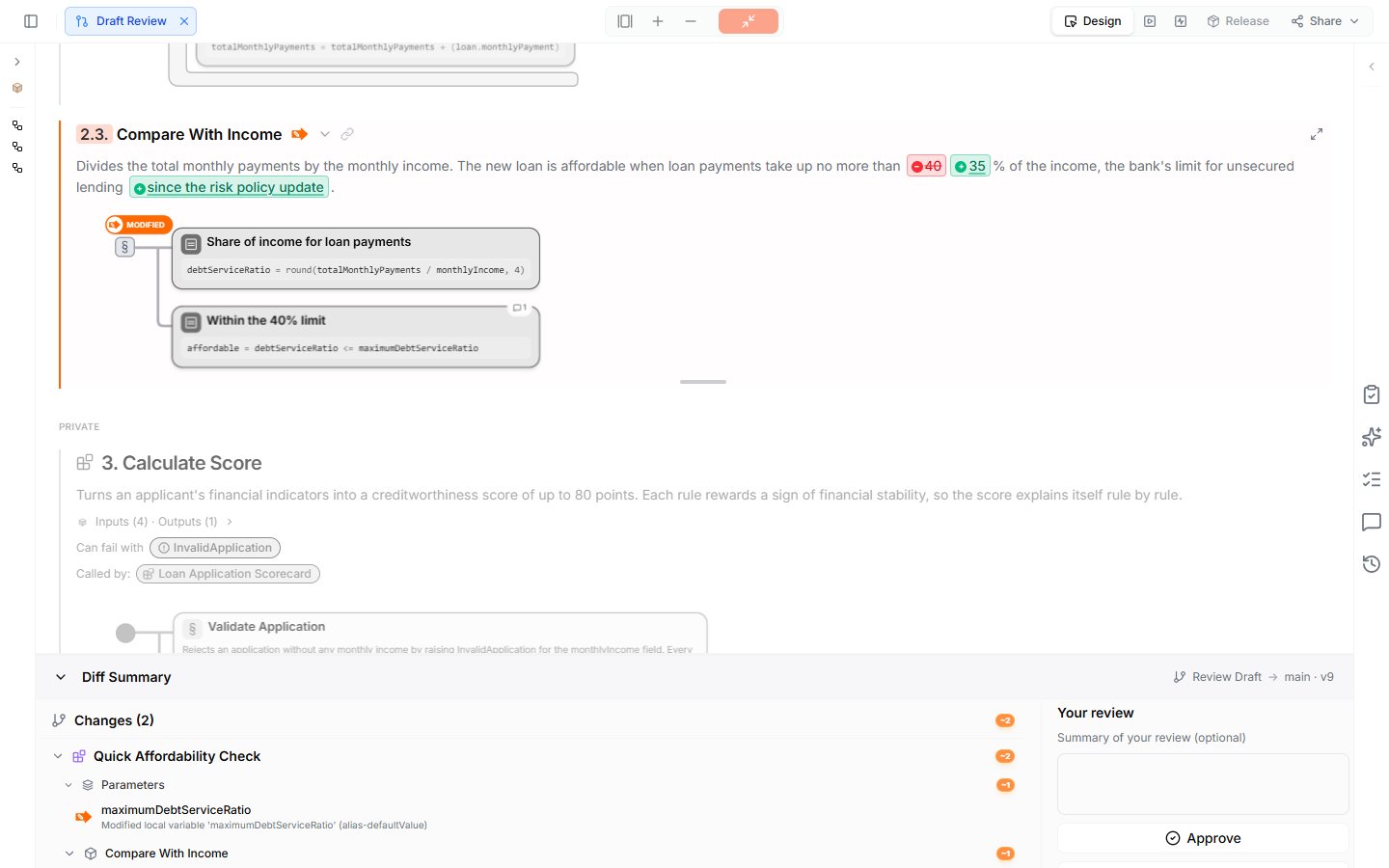 To comment on a step, maximize its section, select the step, and click **Add comment** in the node toolbar. In Draft Review, your comments are **Pending**: only you can see them until you submit your review. **Discard my draft comments** throws them away.
 When you are done, write an optional summary under **Your review** and choose:
* **Approve** — the change can go to main
* **Request changes** — the author has to change something first
* **Comment only** — share comments without a decision
The author sees your decision and your comments right away. Click **×** on the **Draft Review** pill to leave the review.
Comments you write outside Draft Review are published immediately instead of waiting for your review.
### 4. Respond to the review
The author answers each comment under **Review comments** with **Reply** and marks it **Done** when it is settled. When the author changes the draft, the reviewer's earlier decision no longer counts, and they see *The draft changed after your review — decide again to keep it counting.*
### 5. Save the draft to main
When every enforced rule passes, **Save** becomes available. Click it and confirm. The draft's changes become the new version of main, and the [Timeline](/track-changes/timeline) records the change with **Open review**, so you can reopen the review later, read-only.
With **Four-eyes approval** enforced and **Exclude author** on, you cannot approve your own draft. Make sure a second member can review before you enforce the rule.
## Review history
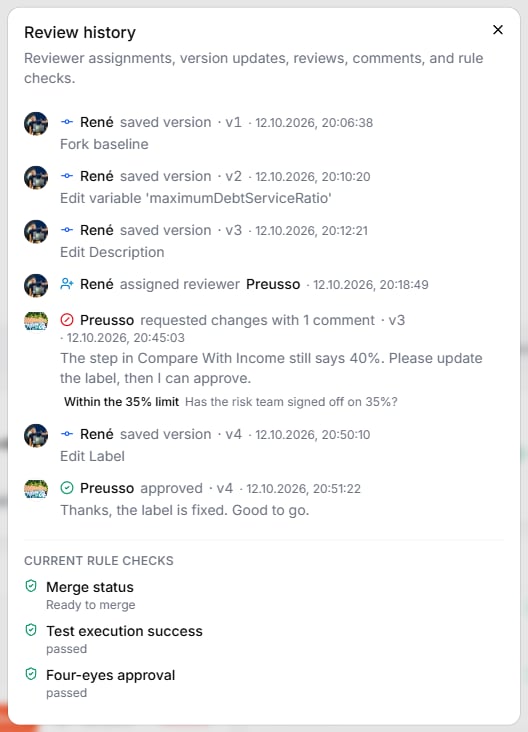
Click the clock icon in **What's changed** to open the **Review history**: every version, reviewer assignment, decision, and comment, with names and timestamps, and the current state of each rule.
When you are done, write an optional summary under **Your review** and choose:
* **Approve** — the change can go to main
* **Request changes** — the author has to change something first
* **Comment only** — share comments without a decision
The author sees your decision and your comments right away. Click **×** on the **Draft Review** pill to leave the review.
Comments you write outside Draft Review are published immediately instead of waiting for your review.
### 4. Respond to the review
The author answers each comment under **Review comments** with **Reply** and marks it **Done** when it is settled. When the author changes the draft, the reviewer's earlier decision no longer counts, and they see *The draft changed after your review — decide again to keep it counting.*
### 5. Save the draft to main
When every enforced rule passes, **Save** becomes available. Click it and confirm. The draft's changes become the new version of main, and the [Timeline](/track-changes/timeline) records the change with **Open review**, so you can reopen the review later, read-only.
With **Four-eyes approval** enforced and **Exclude author** on, you cannot approve your own draft. Make sure a second member can review before you enforce the rule.
## Review history
Click the clock icon in **What's changed** to open the **Review history**: every version, reviewer assignment, decision, and comment, with names and timestamps, and the current state of each rule.
 ## When main has moved on
If someone saved another draft to main while you worked on yours, the **Merge status** check tells you:
* If your changes and theirs do not overlap, the draft can still be saved. **Update from main** in the check rebuilds your draft on top of the latest main, so you review and test against the current state.
* If both changed the same elements, Merge status reports the conflicting changes. **View conflicts** lists them.
## What to do next
* **[Change Workflow](/track-changes/change-workflow)** — the setting that turns on drafts
* **[Timeline](/track-changes/timeline)** — see saved drafts and every version in the change graph
* **[Collaborating](/workspace/collaborating)** — comments outside of reviews
This documentation is built and hosted on [Mintlify](https://mintlify.com), a developer documentation platform.
## When main has moved on
If someone saved another draft to main while you worked on yours, the **Merge status** check tells you:
* If your changes and theirs do not overlap, the draft can still be saved. **Update from main** in the check rebuilds your draft on top of the latest main, so you review and test against the current state.
* If both changed the same elements, Merge status reports the conflicting changes. **View conflicts** lists them.
## What to do next
* **[Change Workflow](/track-changes/change-workflow)** — the setting that turns on drafts
* **[Timeline](/track-changes/timeline)** — see saved drafts and every version in the change graph
* **[Collaborating](/workspace/collaborating)** — comments outside of reviews
This documentation is built and hosted on [Mintlify](https://mintlify.com), a developer documentation platform.