

From the editor to production
Getting a project into production takes three steps:1
Release
Create a release of your project. Production always runs the latest release, so the changes you keep making in the editor don’t reach callers until you release again.
2
Connect
Call the public Blueprints of your release through the REST API, MCP, or an n8n workflow. Each of these needs an API key.
3
Monitor
Watch how your release runs in Insights: its health, every production run, and which parts of your logic are used.
The Share menu
All integration options start from the Share button in the Blueprint Editor toolbar. Click it to see the available options: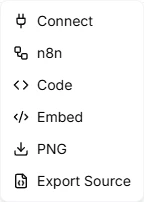
Integration options
Connect via API
Leapter exposes the public Blueprints of your latest release through two protocols:- AI Protocol (MCP) — connect AI assistants and agents using the Model Context Protocol. Ideal for Claude Desktop, Cursor, and other MCP-compatible tools.
- Web API (OpenAPI) — call your Blueprints through a standard REST API from any application. Includes a full OpenAPI specification.
Export to n8n
Leapter can generate complete n8n workflows that you import directly into n8n:- HTTP Workflow — calls your released Blueprint via HTTP API
- Code Workflow — runs your Blueprint logic directly as JavaScript inside n8n, with no external API calls
- MCP Agent Workflow — creates an AI agent that uses your public Blueprints as tools
View as code
Export as Code shows your Blueprint logic transpiled to JavaScript or Python. Use it for code review, porting logic to other systems, or documentation.Embed in websites
Embed in Websites gives you an HTML snippet with a web component that renders an interactive, read-only view of your Blueprint. No authentication required — the Blueprint data is embedded directly in the code.Monitor production runs
Every call to your project through the REST API, MCP, or an n8n workflow is recorded as a production run. To see them, click Insights in the top toolbar of the editor. Insights shows a summary of your project’s health, lists every run with its inputs and outputs, replays a run on the diagram, and turns a run into a test case.What to do next
- Releases — create your first release and choose which Blueprints are public
- API Keys — create API keys to authenticate your integrations
- Web API (OpenAPI) — integrate with any application via REST