

Before you start
- Your project needs a release. MCP always runs the latest release. Changes you make in the editor afterwards don’t reach your AI clients until you release again.
- Only public Blueprints appear as tools.
- You need an API key.
Get the endpoint URL
- Open your Blueprint in the editor.
- Click the Share button in the toolbar.
- Select Connect.
- In the Connect dialog, select the AI Protocol (MCP) tab.
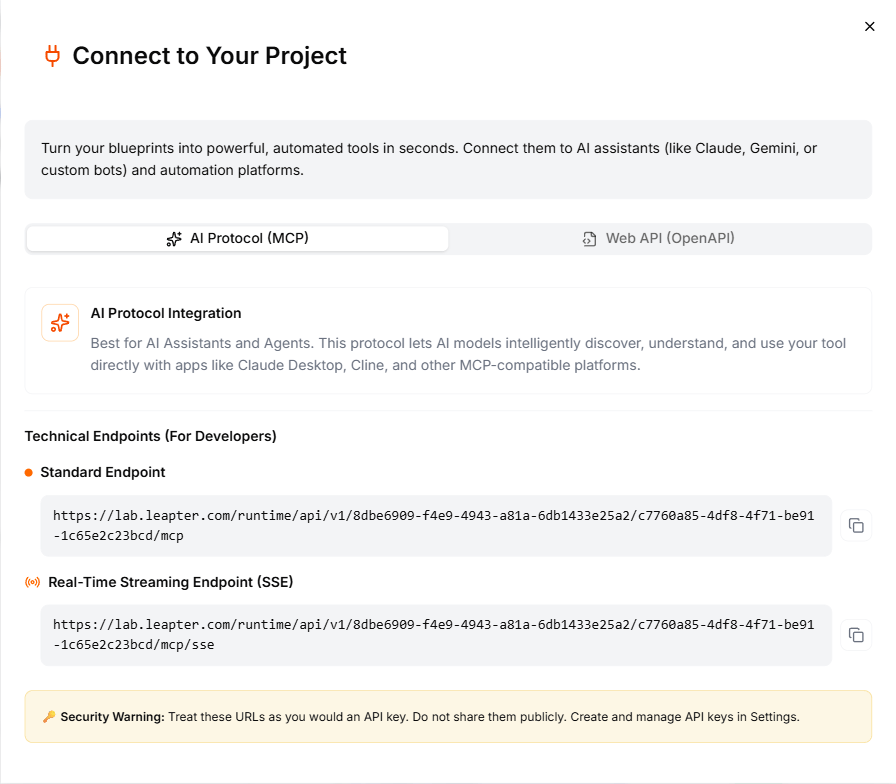
The AI Protocol (MCP) tab shows the two endpoint URLs for your project.
Standard Endpoint
Real-Time Streaming Endpoint (SSE)
Authentication
All MCP connections require an API key. Pass it as a header:- Header name:
X-API-Key - Header value: your API key
Connect with Claude Desktop
- Copy the Standard Endpoint URL from the Connect dialog.
- Open Claude Desktop and go to Settings → Developer → Edit Config.
- Add an MCP server entry in your
claude_desktop_config.json:
- Replace
{appspace},{project-id}, andyour-api-keywith your actual values. - Restart Claude Desktop.
Connect with Cursor
- Copy the Standard Endpoint URL from the Connect dialog.
- In Cursor, open Settings → MCP.
- Add a new MCP server with:
- URL: your Standard Endpoint
- Headers:
X-API-Key: your-api-key
- Save and your public Blueprints become available as tools in Cursor’s AI features.
Connect with other MCP clients
Any MCP-compatible client can connect to your Blueprints. You need:- The Standard Endpoint or Real-Time Streaming Endpoint (SSE) URL (depending on what the client supports)
- An API key passed as the
X-API-Keyheader
What to do next
- Web API (OpenAPI): call your Blueprints through a REST API instead
- API Keys: create and manage API keys
- MCP Agent Workflow: use your Blueprints as tools in an n8n AI agent