

Before you start
- Your project needs a release. The REST API always runs the latest release. Changes you make in the editor afterwards don’t reach the API until you release again.
- Only public Blueprints are available as endpoints.
- You need an API key.
Get the OpenAPI spec URL
- Open any Blueprint in the editor.
- Click the Share button in the toolbar.
- Select Connect.
- In the Connect dialog, select the Web API (OpenAPI) tab.
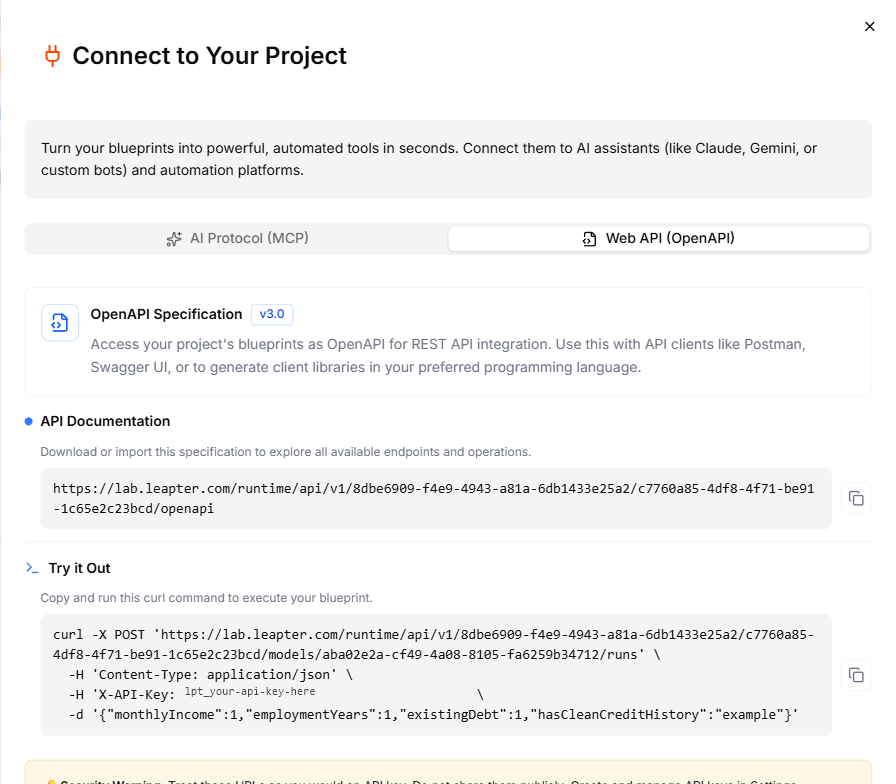
The Web API (OpenAPI) tab shows the spec URL and a ready-made curl example.
The OpenAPI spec covers every public Blueprint in the latest release, not just the one you currently have open.
Authentication
All API calls require an API key passed as a header:- Header name:
X-API-Key - Header value: your API key
Example: call a Blueprint with curl
The Connect dialog provides a ready-made curl command for the Blueprint you have open. It has the appspace, project ID, Blueprint ID, and a sample API key already filled in. The general pattern is:Tag a run with a correlation ID
Add anX-Correlation-Id header to link a run to a record in your own system, for example an application number:
Use with Postman
- Copy the OpenAPI spec URL from the Connect dialog.
- In Postman, click Import and paste the URL.
- Postman generates a collection with all your Blueprint endpoints.
- Set the
X-API-Keyheader in the collection’s authorization settings. - Fill in the request body with your input values and send a request.
Use with Swagger UI
You can also paste the OpenAPI spec URL into Swagger Editor or any OpenAPI-compatible tool to explore and test your endpoints interactively.What to do next
- AI Protocol (MCP): connect AI assistants to your Blueprints via MCP
- API Keys: create and manage API keys
- HTTP Workflow: export an n8n workflow that calls your Blueprint via HTTP