

Get the embed code
- Open your Blueprint in the editor.
- Click the Share button in the toolbar.
- Select Embed.
- Click Copy Code.
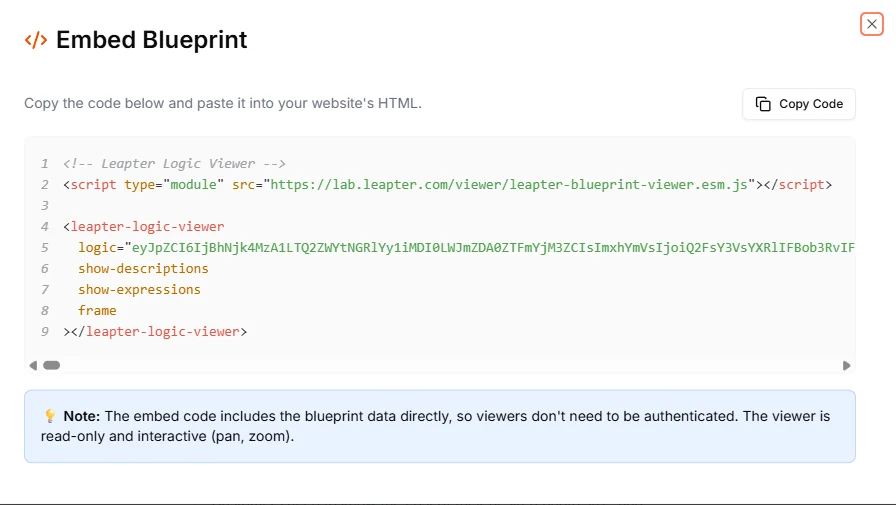
Copy the HTML embed code from the Embed Blueprint dialog.
The embed code
The generated code looks like this:How it works
The embed code includes your Blueprint data directly as a base64-encoded value in thelogic attribute. This means:
- No authentication required: viewers do not need a Leapter account
- No API calls: the Blueprint data is self-contained in the HTML
- Read-only: viewers can explore the Blueprint but cannot edit it
- Interactive: viewers can pan and zoom to navigate the diagram
Customization attributes
The<leapter-logic-viewer> element accepts a small set of attributes. For the on/off options, include the attribute name to turn an option on, and omit it to leave it off:
Updating the embed
Since the Blueprint data is embedded directly in the HTML, the embed shows the Blueprint as it was when you copied the code. If you update your Blueprint, you need to re-copy the embed code and replace it on your website.What to do next
- Export as Code: view your Blueprint as JavaScript or Python code
- Web API (OpenAPI): let users interact with your Blueprint through a REST API
- Deploy & Integrate: explore all deployment options