

View the code
- Open your Blueprint in the editor.
- Click the Share button in the toolbar.
- Select Code.
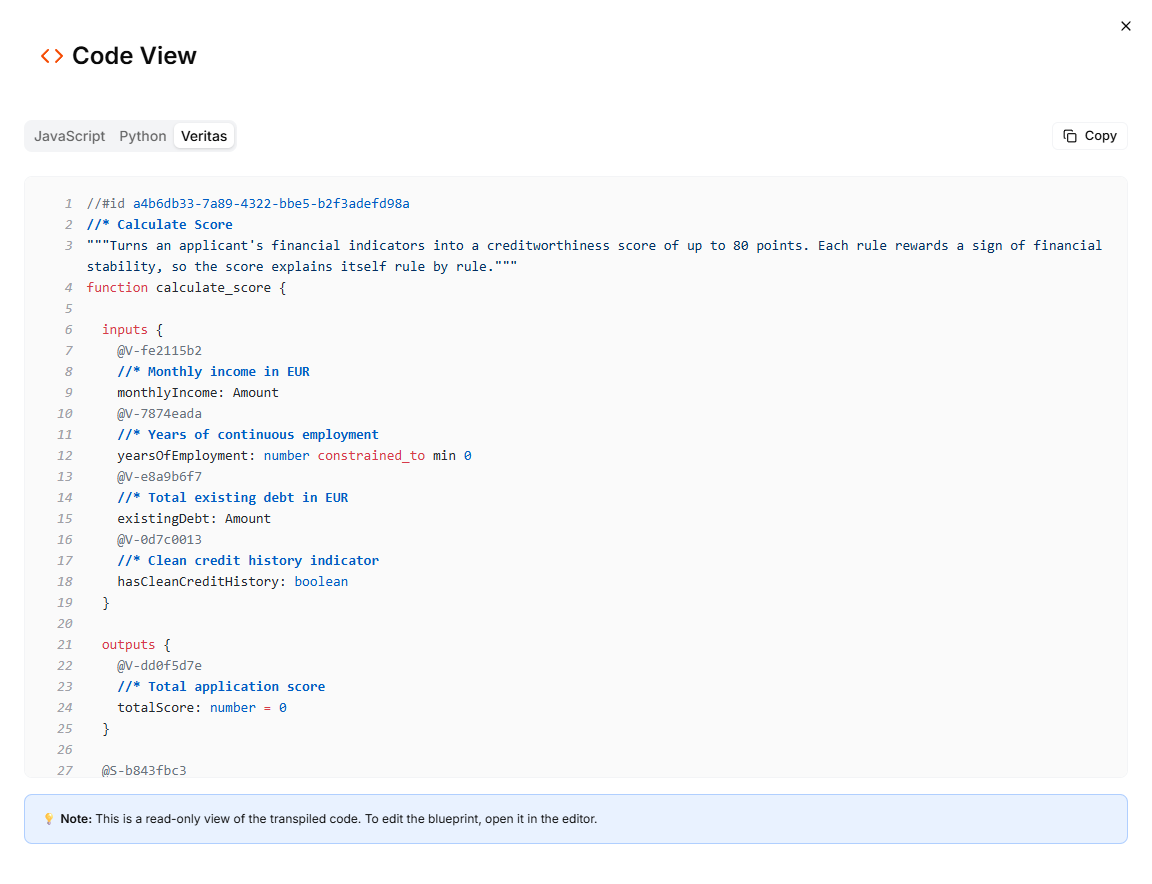
Each tab of the Code View dialog shows the code of every Blueprint in the project.
- JavaScript: your Blueprints transpiled to JavaScript
- Python: your Blueprints transpiled to Python
- Veritas: your Blueprints in Veritas, the language Leapter stores them in
What the code includes
The transpiled code is a self-contained representation of your Blueprint logic:- Function signatures with typed parameters matching your Blueprint’s data contract
- JSDoc comments (JavaScript) or docstrings (Python) describing inputs and outputs
- Conditional logic, calculations, and data transformations: the full execution flow of your Blueprint
The Code View is read-only. To edit your Blueprint, use the Blueprint Editor.
Use cases
- Code review: inspect the generated logic to verify correctness
- Porting to other systems: use the code as a starting point for implementing the logic in your own codebase
- Documentation: include the code in technical documentation to explain what a Blueprint does
- Version comparison: copy the code at different points in time to compare changes
What to do next
- Code Workflow: export the code as part of an n8n workflow
- Web API (OpenAPI): call your Blueprint via REST instead of running the code yourself
- Embed in Websites: embed an interactive Blueprint viewer in a webpage