

The idea in one example
The Loan Application Scorecard example uses one error type,InvalidApplication:
- Defined —
InvalidApplicationis an Error in the Type Definitions, with amessageand thefieldthat needs correcting. - Raised — the private Calculate Score Blueprint raises it when the monthly income is 0 EUR, because no score can be calculated without an income.
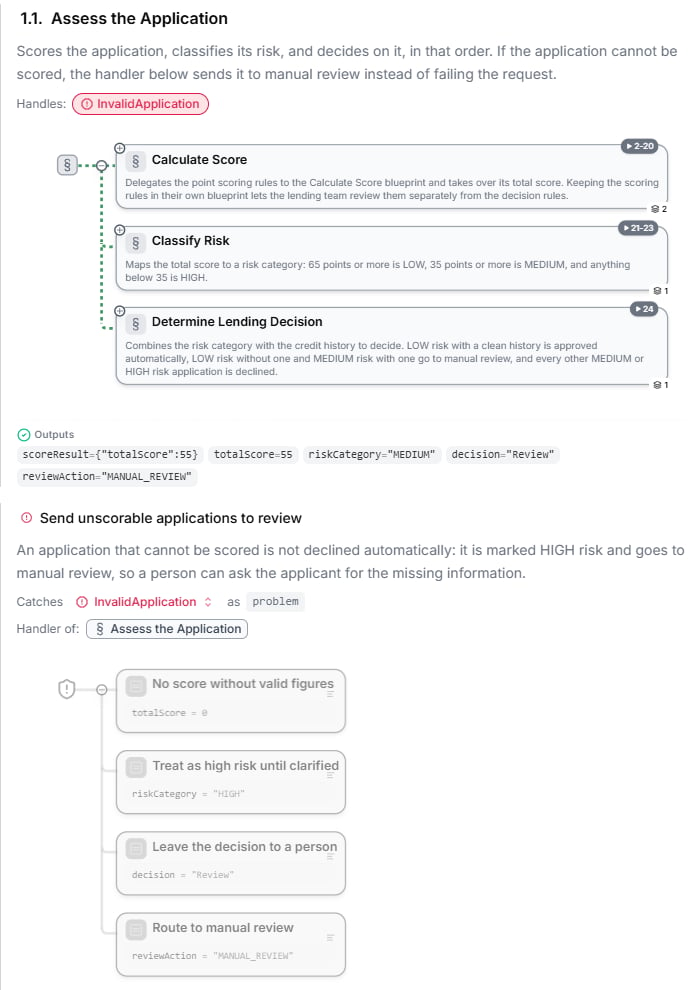
- Handled — the Loan Application Scorecard Blueprint handles it: an application that cannot be scored goes to manual review instead of failing.
- Not handled — the Quick Affordability Check Blueprint raises it too but does not handle it, so a caller of that Blueprint receives the error.
Define an error type
An error type is created like any other type — in the Type Definitions chapter (Add an error type) or with Error on the type canvas. See Type Definitions. Every error type has amessage field that explains the failure in plain words. Add the fields a caller needs to react, for example the name of the input that was wrong. Name the type after the situation, such as InvalidApplication or LimitExceeded.
Raise an error
To stop a Blueprint with an error, add the element Return blueprint with an error from the element palette. In the element, choose the error type after Fail with and fill in its fields — at least themessage.
When a run reaches this element, the Blueprint stops. What happens next depends on whether a section on the way out handles the error:
- Handled — the handler’s steps run, and then the run continues after the handled section.
- Not handled — the run ends with the error. If the Blueprint was called by another Blueprint, the error passes on to that caller. If it was called through the REST API, the call returns HTTP status 500 with the title Run Error, and the response’s
propertiesname the error type and carry its message and fields — so the caller can tell this failure apart from others. The run is listed as an error in Insights.
Handle an error
You handle errors per section:- In the Specification view, open the ⋮ menu of the section whose failure you want to handle and choose Handle an error (“When this section fails with an error”).
- Pick the error type to handle, and name the handler.
- Add the steps that should run instead — usually setting the outputs to a sensible fallback.
Rules for handlers
- A failure raised anywhere inside the section — including inside a Blueprint the section calls — goes to the nearest enclosing section that handles that error type.
- A handler catches exactly the error type it names. To catch every error type, choose any error; put it last, after the handlers for specific types.
- Only handle an error where you have a real fallback. An error that no handler catches reaches the caller, which is often exactly right.
- Technical faults — such as dividing by zero — are not errors in this sense. No handler catches them, and the run fails.
Test for errors
A test case can expect an error instead of outputs. In the test case, set the Expected Error: the Error type, and optionally the Expected error fields. The test passes when the Blueprint raises exactly that error. See Test Suites.What to do next
- Type Definitions — define your error types
- Controlling the Flow — the other elements of a Blueprint
- Test Suites — make sure each error is raised when it should be