

How sections appear
Every Blueprint chapter in the Specification view starts with a structure diagram: the main flow with each section collapsed to one box. The box shows the section’s title, its description, and the number of steps directly inside it.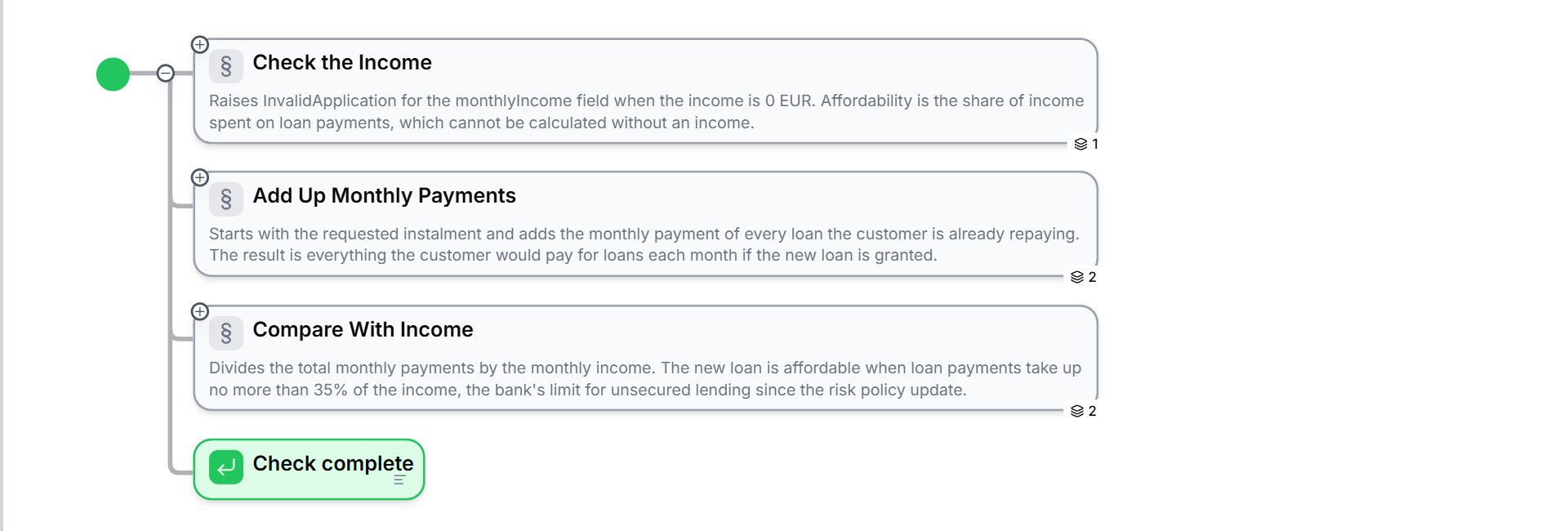
Collapsed to one box each, the three sections of the Quick Affordability Check read like a table of contents.
What belongs in a section
A good section does one job: a group of steps that together produce one result. The Quick Affordability Check, for example, has three sections. Check the Income makes sure there is an income to work with. Add Up Monthly Payments adds up all loan payments. Compare With Income decides whether the new loan is affordable.
Compare the description of Compare With Income in the example project: it names the formula, the 35% limit, and why the limit applies. A description such as Handles the calculation tells the reader nothing.
Section or Blueprint?
A section structures the logic inside one Blueprint. When a part of the logic should be tested on its own, or reused by other Blueprints, make it a Blueprint of its own and call it. In the example project, the scoring rules sit in the private Blueprint Calculate Score, which the Loan Application Scorecard calls. See Calling Other Blueprints.Sections and errors
A section is also the unit for error handling. A section can catch an error raised by its steps and run its own handler instead of failing the whole run. See Error Handling.Work with sections
The Lab Agent writes a title and a description for every section it builds. Run
/review to check that your descriptions still match the logic after you change it.
What to do next
- Controlling the Flow: the elements you place inside a section
- Error Handling: catch errors at the level of a section
- Specification view: read and edit the whole project as a document